

Independent Analytics Pro 2.14.1 – Google Analytics Alternative for WordPress
Feb
Independent Analytics Pro 2.14.1 – Google Analytics Alternative for WordPress
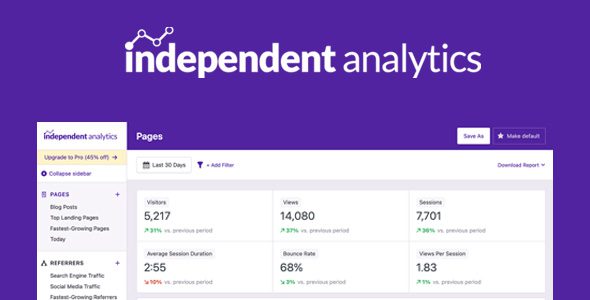
Independent Analytics Pro is a free WordPress analytics plugin that’s easy-to-use, won’t slow down your site, and is fully GDPR-compliant out-of-box.
Every Tool You Need to Analyze & Grow Your Website
- Analytics dashboard inside your WP admin
- Popular posts and pages
- Top traffic sources
- Country & city data with interactive world map
- Device report with device types, browsers, and OS
- Save custom reports
- Export to CSV & PDF
Fully Private for You and Your Visitors
As a Google Analytics alternative, Independent Analytics runs entirely on your site so all of your data is created and stored on your server. No personal data is saved and no cookies are used to track visitors, making it easy to comply with regional privacy laws like the GDPR and CCPA.
Find out what makes Independent Analytics the best WordPress analytics plugin around.
A simple WordPress analytics plugin that is privacy-friendly, fast, and an alternative to Google Analytics.
Premium WordPress Plugins. Join membership for Free Download
Product Description
- Product Type: OSS
- File: Complete
- Versions: Premium
- Usage: Unlimited Domain
- Licenses : This plugin / program is free software:
Explanation about license!
You can redistribute this program and/or modify it under the terms of the GNU General Public License as published by the Free Software Foundation, either version 3 of the License, or (at your option) any later version.
This program is distributed in the hope that it will be useful, but WITHOUT ANY WARRANTY; without even the implied warranty of MERCHANTABILITY or FITNESS FOR A PARTICULAR PURPOSE. See the GNU General Public License for more details. You should have received a copy of the GNU General Public License along with this program. If not, see http://www.gnu.org/licenses/.
Independent Analytics Pro Plugin Features
- Beautiful analytics dashboard
Add a full analytics dashboard right inside your WordPress site. - 100% GDPR compliant
Full GDPR compliance without any configuration or cookie popups. - Made for WordPress
Deep integration with WordPress and no outside accounts needed. - Referrers report
Find the websites sending you the most visitors each month. - Geographic data
Navigate the interactive world map showing where your visitors come from. - Device data
Discover the devices and browsers used by your visitors - Saved reports
Create and save unlimited custom reports. - Easy setup
Starts tracking the moment you install it. No configuration needed. - Campaign Links
Create and track custom campaign URLs. - Real-time Analytics
See how many people are on your site right now. - WooCommerce Analytics
Find your most profitable marketing channels. - Email Reports
Get automated HTML email reports in your inbox.
How to install & use Plugin
The easiest way to install Independent Analytics is by visiting your Plugins > Add New menu. Search for "Independent Analytics" and install the first result you see there.
To install with the zip file downloaded from this page:
- Login to your WordPress dashboard
- Visit the Plugins > Add New menu
- Click the Upload Plugin button at the top
- In the upload form that appears, click the Choose file button and select the independent-analytics.zip file you downloaded here
- Click the Install Now button
- Once the page reloads, click the blue Activate link
Changelog
History
= 2.14.1 - January 27th, 2025 =
- Fix: User Journey cron job would fail
- Fix: Visitors growth and views growth could be inaccurate in Solo Reports
- Fix: Loading Solo Reports was much slower on Firefox
- Fix: Favicons added to /wp-content/uploads/ weren't getting removed via the option to delete all plugin data
= 2.14.0 - January 19th, 2025 =
- Feature: Added User Journeys to Independent Analytics Pro! View full timelines for each session, including clicks, form submissions, and eCommerce orders.
- Feature: Added form tracking for the following plugins: MailChimp for WordPress (MC4WP), Kadence Blocks forms, Newsletter, and Everest Forms.
- Enhancement: Customer Journey box in WooCommerce Order page now links to the full user journey.
- Enhancement: Added compatibility with the YayCurrency plugin.
- Enhancement: Added labels to line chart modules in the Overview report.
- Enhancement: Pie charts in the Overview report are now sorted by size and display a percentage next to each label.
- Enhancement: Added option to pause the delivery of email reports.
- Enhancement: Updated translations in Pro version.
- Enhancement: Added favicons to the Referrers report.
- Enhancement: Added options to refresh the salt token once per week or month.
- Enhancement: Updated the geolocation to IP address database.
- Enhancement: Updated the device detection library.
- Enhancement: Added compatibility notices for the Falcon and HTML Minify plugins
- Fix: Nicely display phone numbers with spaces in the Clicks reports
= 2.13.6 - December 17th, 2025 =
- Fix: Form submission analytics can be inaccurate when specific filters are applied
- Fix: Form submissions would not be tracked if the form had a title longer than 64 characters
= 2.13.5 - November 10th, 2025 =
- Fix: Divi form submissions could be recorded even if they failed
= 2.13.4 - November 4th, 2025 =
- Fix: Some cron jobs could go unscheduled
= 2.13.3 - November 3rd, 2025 =
- Feature: Added eCommerce integration with FluentCart
- Fix: Solo Reports for links could show data for a different link with the same Target
- Fix: Labels now showing correctly for Overview and Real-time reports with collapsed sidebar
= 2.13.2 - October 28th, 2025 =
- Fix: Migration bug fix for 2.13.0
= 2.13.1 - October 21st, 2025 =
- Fix: Migration bug fix for 2.13.0
= 2.13.0 - October 21st, 2025 =
- Feature: Added option to group campaigns by their landing page, source, medium, or campaign name.
- Feature: Added option to group referrers by Referrer Type. Easily compare your Search vs. Social vs. AI traffic.
- Feature: You can now filter by ANY or ALL of the selected filter conditions.
- Enhancement: Massively improved the WooCommerce Order Referrer metabox (renamed to Customer Journey). It now includes the customer’s time of arrival, geolocation, device data, number of pages viewed, and time of purchase.
- Enhancement: All date ranges from the date picker are now available for the Overview modules.
- Enhancement: Added support for the Curcy multi-currency plugin for WooCommerce.
- Enhancement: Added support for the YITH Multi Currency plugin for WooCommerce.
- Enhancement: Added support for WooPayments multi-currency.
- Enhancement: Added new “AI” referrer type to categorize sites like ChatGPT.com.
- Enhancement: Switched to new geographic map created with the svgMap library.
- Enhancement: Post categories in the filters are now sorted based on the category hierarchy, making them much easier to browse.
- Enhancement: The iawp_top_posts() function now supports categories, so you can get your most popular posts from a particular category.
- Fix: Detection added for keeping spam clicks out of the Clicks report.
- Fix: Stopped auto-loading options for the Overview report to reduce overhead.
- Fix: Filter conditions sometimes showed the wrong form name.
- Fix: Fixed the layout of Recent Views and Recent Conversions modules on mobile devices when given a two-column width.
- Fix: Email report could trigger an error due to the line length being too long
- Fix: Resolved PHP error that could occur due to the visitor ID returning a string instead of an integer.
- Fix: Only verify IP to geolocation database file once per day to reduce performance overhead.
= 2.12.2 - August 29th, 2025 =
- Fix: Improved compatability with MariaDB
= 2.12.1 - August 26th, 2025 =
- Fix: Improved compatability with MariaDB
- Fix: Forminator form submissions were not being tracked
Files To Download
| File | |
|---|---|
| independent-analytics-pro_v2_14_1.zip |
- Version 2.14.1
- Release Date 27-01-2025
- License & Support BUY
- File Size 7.52 MB
- File Count 1
- Download
- Create Date 01-02-2025
- Last Updated 21-03-2026
Downloading Instruction
The Independent Analytics Pro 2.14.1 – Google Analytics Alternative for WordPress plugin file can be downloded as a compressed file (zip, rar format).
File(s) you just downloaded can be uploaded directly to your server or WordPress, though some files may require extraction before installation. We ensure that all files are clean and safe, free from malware or viruses. Please remember that the downloaded file do not come with official support or updates. Using the official version is always recommended for security and stability.
Just click on the link (blue / green button in color) to download it to your computer.
Disclaimer
- The item listed in memsuka.com listing is developed by third-party developer.
- We are not associated with nor is endorsed by any of the third party developers or trademark owners mentioned in this site. Any mention of these companies is merely for understanding of clients not misled as to the original source of the product.
- We do not offer any additional services from developers, such as product customization or license keys.
- We would always encourage clients to purchase direct from developer in case they are interested in premium plugin/theme related support & official updates.
- We are Ads free download services.
- The downloaded product:
- is intended for testing purposes only.
- 100% Free From Viruses & Free From Malware
- for Unlimited Use
